Quick Answer: Apollo Group TV operates as an unverified streaming platform without official broadcasting licenses for its stream distribution in the United States. While federal enforcement targets service operators rather than individual consumers, using unverified IPTV services exposes users to sudden domain seizures, bandwidth throttling by internet providers, and non-refundable cryptocurrency payment hazards. Using encrypted connections or selecting verified alternatives remains essential for personal security.
Table of Contents
Is Apollo Group TV Legal to Use in the US?
Apollo Group TV operates without broadcasting licenses in the United States, placing it in violation of federal copyright laws. While enforcement primarily targets service operators rather than individual viewers, end-users face significant risks including stream seizures, privacy vulnerabilities, and service termination without warning.
In the United States, streaming media without copyright authorization violates Title 17 of the United States Code. Federal enforcement agencies prioritize prosecuting platform operators and commercial distributors over casual viewers. However, accessing copyrighted broadcasts from unverified sources still constitutes civil copyright infringement.
Here is what actually happens when copyright holders track unauthorized streams. Anti-piracy coalitions such as the Alliance for Creativity and Entertainment identify streaming servers and obtain court orders to shut down active domain names. When federal authorities seize a server domain, subscribers immediately lose access to their prepaid streaming feeds without any option for financial recourse.
Key Takeaway: While individual subscribers are rarely prosecuted, using unlicensed platforms carries an inherent risk of sudden service blackouts and financial loss.
Why Is Apollo Group TV Considered Unverified?
Apollo Group TV is categorized as unverified because its application is unavailable on official app stores like Amazon, Google, or Apple. Unverified services bypass standard security audits, lack transparent licensing documentation, and frequently require non-traditional payment methods like cryptocurrency or third-party cash transfers.
Mainstream digital storefronts conduct rigorous code reviews before distributing streaming software to the public. Services missing from official app stores bypass automated checks for malware, unauthorized data logging, and credential harvesting. Users must manually install application files onto their hardware, stripping away built-in operating system protections.
ISP Throttling and Copyright Notices
Internet service providers actively monitor network traffic patterns to identify high-bandwidth media streams. When network algorithms detect sustained connections to known unauthorized streaming servers, ISPs initiate automated bandwidth throttling. Subscribers frequently report severe buffering during peak evening hours or major sporting events as a direct result.
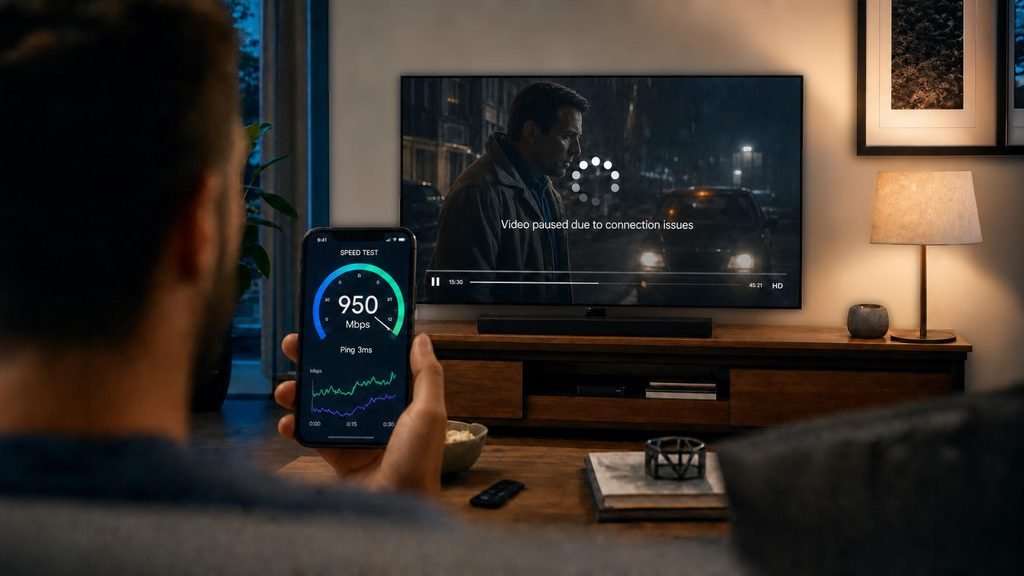
Here is what actually happens during an ISP throttling event. A user attempting to stream a live football game experiences constant buffering every thirty seconds despite possessing a 500 Mbps internet connection. The service provider’s automated network filter flags the unverified stream address and caps the connection speed for that specific server to under 2 Mbps.
Key Takeaway: Network throttling by internet service providers remains the primary cause of stream buffering on unverified platforms.
Payment Security and Clone Site Scams
Securing a subscription to unverified services presents severe financial security challenges. Apollo Group TV has largely transitioned to Bitcoin and cryptocurrency transactions, eliminating credit card chargeback protections for consumers. If a payment fails to activate an account, the buyer has zero consumer recovery options.
Furthermore, dozens of fraudulent imitation websites occupy search engine results for this brand. Unsuspecting users attempting to buy IPTV subscription packages often submit payment details to spoofed web domains. These phishing operators take the funds without providing login credentials, or worse, compromise the buyer’s financial data.
Key Takeaway: Cryptocurrency requirements and fraudulent clone sites make subscribing to unverified services financially hazardous.
Apollo Group TV vs. Safer IPTV Alternatives
Evaluating streaming platforms requires analyzing licensing compliance, payment gateway security, server uptime, and customer support channels. Verified services provide end-to-end encrypted payment processing, dedicated application updates, and reliable delivery networks, whereas unverified options carry high technical friction and legal uncertainty for consumers.
Selecting a reliable streaming provider involves balancing content variety against operational security. Many users turn to community forums like the iptv provider reddit subreddits to evaluate user feedback before committing to long-term plans. Comparing structural factors highlights why verified and top-tier provider frameworks offer superior consumer protection.
The following matrix evaluates the core technical and legal parameters of popular service configurations.
Evaluation Criteria
Apollo Group TV
Standard Unverified Services
Top-Tier Verified Alternatives
Licensing Status
Unlicensed
Unlicensed
Fully Licensed
App Store Availability
Sideload Only
Sideload Only
Amazon, Google, Apple Stores
Payment Methods
Cryptocurrency / Cash App
Crypto / Unverified Gateways
Credit Card, PayPal, Apple Pay
Stream Infrastructure
Shared CDN (High Throttling)
Basic Web Host
Enterprise CDN (99.9% Uptime)
ISP Throttling Risk
Severe
High
None
Free Trial Availability
Rare / Paid
Occasional
Guaranteed 24-Hour Trial
Refund Rights
None
None
30-Day Guarantee / Chargeback
Data compiled across active US streaming platforms, updated October 2026.
When comparing options, platforms offering a genuine IPTV free trial 24 hours allow users to test connection stability on their home network before making any financial commitment. Furthermore, choosing a service with transparent payment processing eliminates the risks associated with unverified crypto transactions.
Key Takeaway: Verified alternatives and highly structured providers give consumers far greater privacy, payment protection, and stream stability than unverified platforms.
What Are the Prerequisites for Unverified Streaming Devices?
Preparing a streaming device requires verifying hardware specifications, system storage, and network speed before installing third-party applications. Devices must run a modern operating system, maintain at least two gigabytes of available internal memory, and connect to a network delivering minimum speeds of twenty-five megabytes per second.
Modern media playback demands robust hardware processing power and clean storage management. Hardware like the Amazon Fire TV Stick requires periodic maintenance to prevent application crashes and memory bottlenecking during high-bitrate live streams.
Before configuring any streaming environment, verify that your hardware meets these baseline technical prerequisites:
Operating System: Amazon Fire OS 7 or Fire OS 8 (or Android TV 10.0+).
Available Storage: Minimum 2.0 GB free local storage space.
Network Speed: 25 Mbps downstream bandwidth for 1080p live streams (50 Mbps for 4K content).
Network Privacy: Encrypted VPN application active on the local device.
Security Settings: Sideloading permissions granted under device developer options.
Here is what actually happens when storage drops below one gigabyte on a streaming stick. The device operating system aggressively purges background cache files while you watch live TV, causing frame drops, audio desynchronization, and sudden app crashes back to the home screen.
Checking these prerequisites prevents hardware-level performance issues before addressing software configurations. Identifying the best IPTV app for Firestick with subscription compatibility ensures smooth video rendering across all channel categories.
Key Takeaway: Adequate device storage and a fast, encrypted network connection are essential to prevent streaming performance drops.
Player App Options and Compatibility
Player applications serve as the interface for decoding live channel feeds and video-on-demand content. Options like Startup Show, TiviMate, and VLC Media Player vary significantly in user interface customization, electronic program guide integration, multi-screen support, and overall resource consumption on streaming hardware.
Selecting the right video player application directly impacts navigation speed and playback smoothness. Unverified providers often recommend proprietary player apps, but third-party media players frequently deliver vastly superior performance and customization options.
Users typically choose between three dominant playback applications:
Startup Show: The default player recommended for Apollo Group TV, offering simple M3U login integration but limited user interface customization.
TiviMate: Widely regarded as the premier player interface for Android TV and Fire OS, featuring multi-screen viewing, advanced EPG layouts, and custom catch-up scheduling.
VLC Media Player: A lightweight, highly compatible open-source player that excels at decoding troublesome video codecs when standard applications fail to render video.
Here is what actually happens when switching from a default player to TiviMate. Channel switching time decreases from four seconds down to under one second because TiviMate pre-buffers incoming stream playlists in the local device RAM.
Key Takeaway: Upgrading to an advanced player app like TiviMate significantly enhances menu navigation speed and channel switching performance.
How Do You Troubleshoot Common Apollo Group TV Errors?
Troubleshooting streaming errors requires resolving software permission blocks, clearing application cache, adjusting network security protocols, and managing device storage. Most failure points stem from Amazon Fire OS developer option updates, network throttling by service providers, or corrupted playlist data stored in the local application memory.
Technical glitches occur frequently when operating unverified streaming tools on modern smart TV hardware. Understanding how to resolve specific failure points saves hours of frustration when streams stall or applications refuse to load.
Addressing the four most common Firestick failure points requires specific technical fixes:
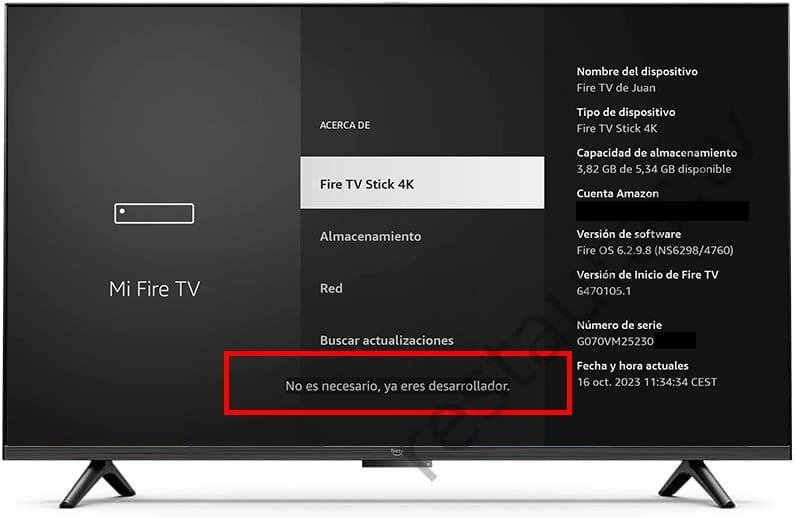
Missing Developer Options on Newer Fire OS BuildsOn devices running recent Fire OS updates, Amazon hides the Developer Options menu by default. According to official Amazon Fire TV support documentation, navigate to Settings > My Fire TV > About, highlight your device name, and press the Select button on your remote exactly seven times. A prompt will confirm that Developer Options are now unlocked.
Sideloading Blocked or Installation FailedIf Downloader displays a permissions error, navigate to Settings > My Fire TV > Developer Options > Install Unknown Apps. Locate Downloader in the app list and toggle the setting to ON.
Continuous Buffering After InstallationPersistent buffering usually indicates network throttling by your internet provider or server congestion. Launch your active VPN application, connect to a server in a neighboring city, and change your player app stream format from HLS to MPEG-TS within playback settings.
Insufficient Storage WarningWhen internal space drops below 500 MB, open Settings > Applications > Manage Installed Applications. Select heavy applications and click Clear Cache to free up local memory without deleting login credentials.
Here is what actually happens when Amazon updates device firmware automatically. The update resets system privacy toggles, which disables third-party app permissions and causes custom player apps to close immediately upon launching.
If persistent playback issues continue despite applying these fixes, exploring a reliable alternative like Xtreme HD IPTV official website standards or reviewing the best IPTV service 2026 rankings can help you secure a stable connection.
Key Takeaway: Unlocking hidden developer options and clearing app cache resolves the vast majority of Fire OS sideloading and streaming errors.
Legality and Terms Considerations
Navigating legal and terms-of-service considerations requires recognizing regional copyright legislation and digital privacy laws. Consumers should understand that accessing unlicensed broadcasts violates platform terms of service and carrier agreements, making data privacy protection and clear understanding of consumer liability critically important.
Digital copyright laws vary by country, but enforcement frameworks in Western nations have tightened significantly. In the United States, legislative measures like the Protect Lawful Streaming Act target commercial digital piracy networks that stream unauthorized channels for profit.
While legal proceedings focus on commercial operators, end-users face non-legal consequences as well. Internet service providers routinely issue official copyright warning notices to account holders whose IP addresses connect to flagged server addresses. Multiple notices can lead to permanent termination of home internet service.
Always maintain active network encryption when testing unverified software to safeguard your personal IP address from automated tracking sweeps. Those seeking flexible streaming arrangements should inspect explicit service terms, transparent subscription details, and active user reviews on official brand platforms like https://xtrmehdiptv.us before providing sensitive credentials.
Key Takeaway: Operating unverified streaming software without network encryption risks ISP copyright notices and potential service termination.
Frequently Asked Questions
Is Apollo Group TV illegal to use in the US?
Apollo Group TV operates without official broadcasting licenses in the United States, placing its channel distribution in violation of federal copyright laws. While individual viewers are rarely targets of criminal prosecution, accessing unlicensed streams carries civil risks, ISP warnings, and potential privacy vulnerabilities.
Can I get fined for watching Apollo Group TV?
Federal law enforcement agencies focus prosecution efforts on commercial platform operators rather than individual consumers. However, streaming unlicensed media violates internet provider terms of service, which can result in formal copyright warning letters or account suspension from your provider.
Why does Apollo Group TV require Bitcoin for payment?
Unverified streaming platforms utilize Bitcoin and cryptocurrency to bypass traditional financial networks and credit card processors. Payment processors routinely ban unlicensed media operators, prompting services to use non-refundable crypto channels that offer zero buyer chargeback protection.
Why is Apollo Group TV buffering constantly on my Firestick?
Continuous buffering typically occurs due to internet provider bandwidth throttling, server congestion during live events, or insufficient device storage. Enabling a high-speed VPN and switching video playback formats within TiviMate or Startup Show usually resolves connection bottlenecks.
Is there an IPTV free trial 24 hours available?
Apollo Group TV rarely offers free testing options, usually requiring paid trial periods or direct subscriptions. Alternatively, premium verified platforms provide a structured IPTV free trial 24 hours window so users can test stream stability before purchasing.
How do I fix missing developer options on Firestick?
Navigate to Settings > My Fire TV > About on your Amazon device. Highlight your Fire TV model name and click the center remote button seven times consecutively until a notification pops up stating you are now in developer mode.
Next Steps for Secure Streaming
If you currently use or are considering an unverified streaming service, securing your home network is your immediate priority. Install a reputable, zero-logs VPN on your streaming device to encrypt all incoming and outgoing internet traffic before launching any third-party player applications.
For users seeking a stable long-term streaming experience without the hassle of crypto payments, domain seizures, or continuous buffering, explore transparent options. Check out available pricing tiers and secure a verified subscription to enjoy uninterrupted, high-definition live television today.